Several years ago, I built my first interactive GIS web applications in ActionScript, when Flex still competed on equal footing with other technologies for building rich web applications — comparable to desktop apps — including GIS viewers. Later, I migrated to OpenLayers and the HTML/JS ecosystem.
Now, having retired, I have decided to dedicate my time to humanitarian and community initiatives, supporting the development of open data and non-profit GIS tools.
Claude as a development tool
To tackle these projects efficiently, I turned to Claude (Anthropic’s family of language models) as a development assistant. My role was clear: architect and project director. I defined the requirements, made design decisions, contributed specialized knowledge in QGIS and cartography, provided test files, identified bugs, and validated each feature against real QGIS behavior. Claude, for its part, was responsible for writing the code.
The distinction is key: Claude generated the implementation, but without my direction — grounded in years of GIS and web development experience — it would not have known what to build, how to structure it, or whether the result was correct. In practice, the process was an iterative technical conversation: I posed the problems, evaluated the solutions, and guided the adjustments.
QGIS Layer Viewer: a bridge between QGIS and the web
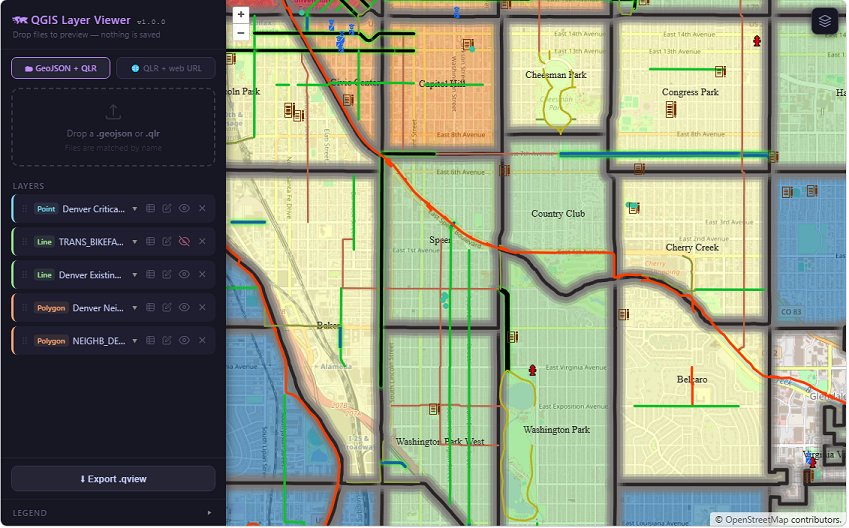
QGIS Layer Viewer is a lightweight, serverless web map viewer that reads QGIS Layer Definition files (.qlr) and GeoJSON data directly in the browser, rendering them on an OpenLayers map with styling that faithfully replicates the original QGIS project.
- No backend, no server-side processing, no dependency on cloud services.
- Files are loaded locally or from a URL.
- Everything runs in the browser.
Who is it for? GIS professionals who work in QGIS and need to share styled maps on the web without rebuilding the symbology from scratch.
What problem does it solve? The gap between a styled QGIS layer and a publishable web map:
Export the
.qlr, pair it with a GeoJSON, drop both into the viewer — done.
What is it not? It is not a full GIS editor. It does not support raster layers, WMS, or complex QGIS expressions. It is a read-only tool, designed for quick preview and sharing.
For web developers
The QGIS Layer Viewer source code is not only functional, but also offers concrete solutions to poorly documented problems, such as:
- Translating QGIS symbology to OpenLayers.
- Paginating ArcGIS services.
- Detecting features on polygons with transparent fill.
In my next post, I will go deeper into this application and its technical details.